Not every AI recruiting tool solves the same problem. Some help recruiters write candidate messages, others analyze profiles, screen applications, schedule interviews, manage hiring workflows, document conversations, or support workforce planning.
That is why choosing an AI tool for recruitment should not start with the tool itself. It should start with a much more practical question: Which part of the recruitment process are we actually trying to improve?
In this guide, we compare the main types of AI tools used in recruitment, including AI sourcing tools, ATS platforms with AI features, screening tools, outreach tools, AI notetakers, recruiting chatbots, and talent intelligence platforms.
We also explain when a company needs a tool, when it needs a more structured process, and when an AI-powered recruitment service may be a more practical choice.
What Are AI Recruiting Tools?
AI recruiting tools are software solutions that use artificial intelligence to support different stages of the hiring process. They can help with candidate sourcing, communication, ATS workflows, CV analysis, screening, interview documentation, candidate engagement, and talent market analysis.
This is a broad category, which makes direct comparison difficult. A tool that helps write candidate outreach messages does something very different from a system that scores CVs or recommends which candidates should move to the next stage.
That is why AI recruiting tools should not be compared only by feature lists.
Read also: AI in Recruitment: Where It Helps & Where Recruiters Get Burned
How to Choose AI Tools for Recruitment
Many AI tools promise time savings, but in practice they may create an additional layer of work: configuration, integrations, output review, team training, quality control, and system management.
Before choosing a tool, companies should decide whether they need software for their internal team or a ready-made AI-powered recruitment service.
To make the decision easier, we prepared a simple formula, based on 10 core criteria.
1. Stage of the recruitment process
Does the tool support sourcing, screening, communication, ATS management, assessment, scheduling, documentation, or workforce planning?
AI tools work best when they are connected to a clearly defined stage of the process.
2. Data quality
What data does the tool work with? Is the data accurate, current, and structured enough for AI to analyze? If the data is outdated, incomplete, or poorly organized, the AI output will be weaker.
3. Integrations
Does the tool integrate with the company’s ATS, LinkedIn, calendar, CRM, email, HRIS, or other internal systems?
A tool that does not fit into the existing workflow may create more work instead of reducing it.
4. Human-in-the-loop control
Can a recruiter review, change, and challenge the AI output?
This is especially important when the tool affects candidate evaluation or prioritization.
5. Explainability
Can the tool explain why a candidate received a certain score, recommendation, or ranking?
Recruiters and hiring managers should understand the logic behind AI-supported results.
6. Candidate experience
Will candidates experience the tool as helpful and efficient, or as impersonal automation?
This is especially important for outreach, chatbots, screening, and scheduling.
7. Legal and ethical risk
Does the tool influence decisions about candidates?
The closer a tool is to selection, rejection, or ranking, the more important transparency, validation, and human oversight become.
8. Measurability
Can the company measure the quality of the results, not only the number of actions performed?
Good metrics include response rate, qualified longlist quality, hiring manager acceptance rate, candidate conversion, and false positive rate.
9. Implementation cost
Does the company have the time, data, people, and internal ownership needed to use the tool regularly?
An AI tool that requires heavy configuration, training, and workflow redesign may not deliver value quickly.
10. Real business impact
Does the tool help the company reach better candidates, make better hiring decisions, or reduce operational work?
Or does it simply generate more data for recruiters to manage?
AI Recruiting Tools Compared: Main Categories and Use Cases
AI in recruitment works best when it supports a specific part of the process.
That is why it is more useful to compare AI recruiting tools by category rather than treating them as one universal group.
| Type of AI recruiting tool | What it supports | Example use case |
| AI sourcing tools | Finding and prioritizing candidates | Building longlists, reaching passive candidates, rediscovering profiles in the database |
| ATS platforms with AI features | Managing recruitment workflows | Candidate matching, profile summaries, notes, statuses, reporting |
| AI screening tools | Initial candidate evaluation | CV analysis, candidate scoring, qualification questions |
| AI outreach tools | Candidate communication | Sourcing messages, follow-ups, message personalization |
| AI notetakers | Interview documentation | Transcriptions, summaries, scorecard notes, hiring feedback |
| Recruiting chatbots | Candidate experience and process automation | Scheduling, FAQ, application support, candidate reminders |
| Talent intelligence tools | Market and skills analysis | Talent mapping, skills analysis, workforce planning |
1. AI Sourcing Tools
Best for
AI sourcing tools are useful for companies that struggle to reach the right candidates, especially passive candidates. They help recruitment teams search the market faster, analyze candidate profiles, rediscover people from previous processes, and build longlists of candidates worth contacting.
AI sourcing tools are often used in specialist, niche, or hard-to-fill recruitment processes where job ads alone are not enough. They work best when the company already knows what kind of candidate it needs but wants a better way to find similar profiles across multiple sources.
Our choice
SeekOut
SeekOut can be a strong choice for teams that need outbound sourcing, access to large candidate databases, and support in engaging passive candidates.
hireEZ
hireEZ may be useful for companies that want to combine sourcing, CRM, candidate rediscovery, analytics, and outreach automation in one platform.
LinkedIn Recruiter AI
LinkedIn Recruiter AI is a natural option for teams already working heavily on LinkedIn and looking to improve profile search and message personalization.
What to watch out for
AI sourcing tools can help recruiters find more profiles, but they do not guarantee better recruitment. A company still needs a clear brief, defined evaluation criteria, candidate segmentation, quality control, and relevant outreach. Without a structured process, a sourcing tool may simply generate a long list of people who do not convert into real conversations.
2. ATS Platforms with AI Features
Best for
ATS platforms with AI features are useful for companies that already have a recruitment process, a candidate database, and a team working in one system.
These tools help improve daily operational work. They can support candidate matching, profile summaries, message generation, feedback, reporting, workflow management, and data organization.
They work best for organizations that do not need a separate sourcing tool but want to use AI inside the system where they already manage recruitment. This is especially useful for teams that have a lot of data in their ATS and want to use it more effectively.
Our choice
Ashby
Ashby is a great AI-powered ATS for startups, scale-ups, and technology teams that want to combine ATS, CRM, sourcing, scheduling, analytics, and AI in one platform.
Greenhouse
Greenhouse can be a good choice for companies that need a mature ATS, structured hiring workflows, scorecards, reporting, and AI features that support the hiring process.
Workable
Workable is a popular recruitment platform with AI features that help teams search profiles, create job descriptions, and support hiring workflows.
What to watch out for
AI in an ATS mostly works with the data already stored in the system.
If the candidate database is outdated, poorly described, or too limited, adding AI will not fix the core problem.
The quality of AI output depends heavily on the quality of the data underneath it.
3. AI Screening Tools
Best for
AI screening tools are useful for companies that need to speed up initial candidate selection.
They can help analyze CVs, application forms, candidate answers, skills tests, or asynchronous interviews.
These tools are often used in high-volume recruitment, campus hiring, frontline hiring, and processes where many candidates meet similar basic criteria.
They help recruitment teams identify which candidates should be reviewed or contacted first.
Our choice
HireVue
HireVue is one of the most recognizable enterprise tools for video interviewing, assessments, and skills validation, and is our top choice in this category.
Sapia.ai
Sapia.ai focuses on structured, chat-based AI interviews and can be useful in high-volume recruitment where fast screening is important. We might be biased here, but we love the UI on this one.
Vervoe
Vervoe, even if a bit generic, is still a strong candidate for companies that want to assess practical candidate skills rather than rely mainly on CV claims.
What to watch out for
AI screening is one of the most sensitive areas of AI in recruitment because it sits close to decisions about who moves forward. The more influence a tool has on candidate evaluation, the more important it becomes to define clear criteria, explain results, and keep human oversight in the process.
AI should never automatically decide a candidate’s outcome without recruiter verification!
Companies should be wary of overly rigid criteria or misread experience, which can create situations where strong candidates are rejected because their profiles don’t match a narrow pattern.
4. AI Outreach and Candidate Communication Tools
Best for
AI outreach tools are useful for teams that do a lot of direct search and want to prepare candidate messages faster.
They can help write first messages, follow-ups, communication variants for different candidate segments, and role-specific outreach content.
They work best when recruiters contact passive candidates and want to improve response rates without sending the same message to every person on the longlist.
Our choice
Textio
Textio can help companies improve the language of job ads, recruitment communication, and candidate-facing content, especially in terms of clarity, attractiveness, and inclusivity. It’s like Grammarly for recruiters, just better.
Gem
Gem is a strong tool for outbound recruiting teams wanting to manage sourcing campaigns, follow-ups, and communication analytics.
SourceWhale
SourceWhale can support teams that want to automate multichannel outreach and organize communication with passive candidates.
What to watch out for
AI can help recruiters write faster, but it can also make it easier to send generic messages at scale. That can be risky since candidates quickly recognize messages without real context.
A good sourcing message should clearly show why the recruiter is contacting this specific person. If personalization is limited to the candidate’s name, job title, and company name, the message will likely feel automated.
5. AI Notetakers and Interview Documentation Tools
Best for
AI notetakers are useful for teams that conduct many interviews and want to reduce the time spent on manual notes, summaries, and feedback. They can help transcribe conversations, create structured notes, organize information for scorecards, and prepare debriefs for hiring managers.
They work especially well in companies where many people are involved in recruitment and where feedback quality affects the speed of decision-making.
Our choice
Pillar
Pillar, now part of Employ, can support companies that want to improve interview quality, analyze interview performance, and standardize evaluation.
BrightHire
BrightHire can help teams structure interviews, notes, and feedback around competencies and scorecards.
Metaview
Metaview is designed specifically for recruitment and can support interview notes, summaries, and candidate feedback workflows. While not the strongest choice, it’s a quality tool that does deserve our recommendation.
What to watch out for
This is one of the lower-risk AI categories in recruitment because it supports documentation rather than candidate decisions.
However, AI-generated notes should not be treated as a complete and unquestionable record of the conversation. Recruiters should still check whether the summary missed important context, simplified the candidate’s answer, or turned uncertain information into a fact.
6. Recruiting Chatbots and Candidate Experience Automation
Best for
Recruiting chatbots are useful for companies that run many repetitive hiring processes.
They can answer basic questions, guide candidates through applications, collect information, schedule interviews, send reminders, and explain next steps.
They work particularly well in high-volume recruitment, frontline hiring, retail, hospitality, logistics, manufacturing, and other processes where speed, availability, and operational efficiency matter.
Our choice
Paradox
Paradox is one of the strongest conversational AI solutions for recruitment, especially in high-volume and frontline hiring.
Sense
Sense can support candidate communication, message automation, and engagement in organizations with many recruitment processes.
Humanly
Humanly, with its arguably quirky name, can help companies automate conversational screening, scheduling, and candidate communication.
What to watch out for
Chatbots can improve recruitment administration, but they should not replace access to a real person.
They can handle simple questions about application status, interview times, or process steps. They may struggle with unusual questions, individual candidate situations, or sensitive communication.
Candidates should always have a way to contact a recruiter when automation is not enough.
7. Talent Intelligence Tools
Best for
Talent intelligence tools help companies analyze candidate and employee skills, identify capability gaps, map talent markets, support internal mobility, and plan hiring in a longer-term perspective.
They work best when recruitment is not treated as a one-off process but as part of a broader talent strategy.
These tools are useful for organizations that want to understand which skills they will need in the next few quarters, where those skills can be found, and whether some of them can be developed internally.
Our choice
Eightfold
Eightfold is one of the most well-known talent intelligence platforms for large organizations. It supports skills analysis, candidate potential assessment, workforce planning, recruitment, and internal mobility. Talk about full package.
Gloat
Gloat focuses mostly on internal talent marketplaces, internal mobility, skills planning, and better use of talent already present in the organization.
Visier
Visier, our last entry here, can be useful for organizations that want to connect HR data, workforce planning, people analytics, and business scenarios.
What to watch out for
Talent intelligence tools can bring high strategic value, but they require organizational maturity. To work well, the company needs reasonably structured data about roles, skills, employees, candidates, and HR processes.
Companies should also avoid treating skills data as fully objective. A profile, CV, or internal record may show part of the picture, but it rarely captures the full context of a person’s ability, motivation, or potential.
Implementing AI Tools in Recruitment: The Role of AI Orchestration
After comparing different types of AI recruiting tools, it is worth asking another question: How can a company implement AI in recruitment without giving recruiters yet another system to manage?
This is where AI orchestration becomes important.
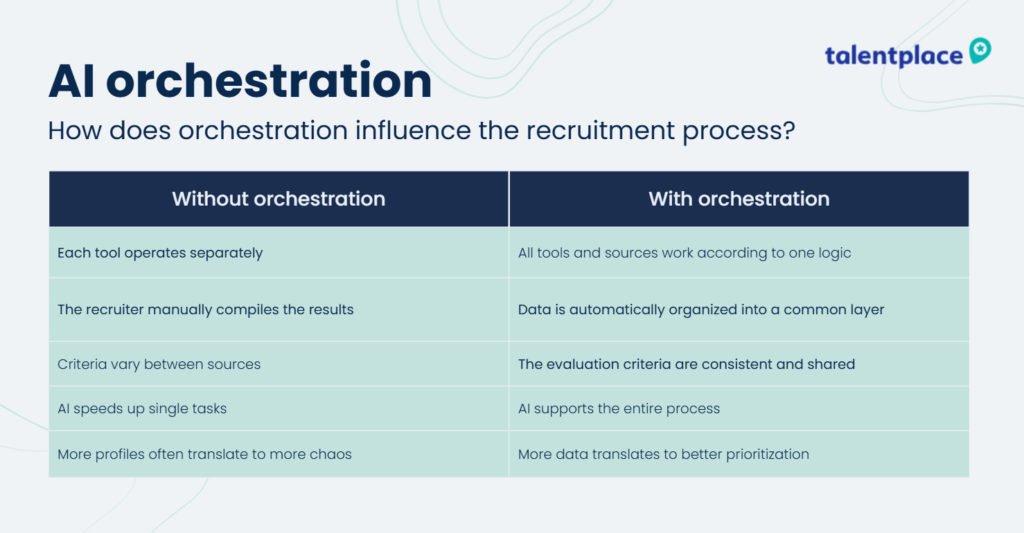
AI orchestration is a way of organizing AI-supported work so that different data sources, tools, and actions are connected by one process logic.
Without orchestration, a company may have several good tools and still work chaotically.
One tool may help find profiles. Another may generate outreach messages. A third may organize ATS data. But the recruiter still has to compare results manually, remove duplicates, verify profile quality, update records, and explain to the hiring manager why a candidate made it onto the list.
AI orchestration helps connect the process.
Candidates from LinkedIn, ATS, external databases, previous recruitment projects, and recruiter networks can be evaluated according to the same logic. That means sourcing, scoring, outreach, and reporting become parts of one workflow unified in one shared operational layer.
If you want to know more about the role of orchestration in AI, we wrote about it here: Why AI Recruitment Automation Needs Orchestration
The Takeaway: The Best AI Recruiting Tool Is the One That Matches the Problem
AI tools can improve recruitment, but only when they are selected for a specific problem.
The biggest risk appears when a company buys an AI tool before organizing the recruitment process. In that situation, AI may increase the number of profiles, messages, reports, and data points, but not necessarily the quality of hiring.
This is why AI orchestration is becoming more important. Recruitment teams need a shared logic for working across multiple sources, consistent evaluation criteria, and a process in which AI supports recruiters instead of replacing their judgment.
That is the idea behind the Talent Place AI Orchestrator.
Instead of treating AI as another isolated tool, our Orchestrator helps structure how AI supports the recruitment process. It connects data, candidate search, profile analysis, prioritization, and recruiter verification around one clear process logic.
It is also worth remembering that not every company needs to buy another tool.
If the internal team has time, data, process maturity, and clear ownership, implementing AI recruitment software may make sense. But if the company needs a practical outcome quickly, such as a qualified longlist, access to passive candidates, or support in a difficult search, an AI-powered recruitment service may be the better option.
If your company is exploring AI in recruitment, it may be worth looking beyond single tools and thinking about the process they are meant to support.
FAQ
- What are the best AI tools for recruitment?
The best AI tool depends on the problem a company wants to solve. AI sourcing tools help find candidates, screening tools support initial evaluation, ATS platforms organize recruitment workflows, outreach tools improve communication, chatbots support candidate experience, and talent intelligence tools help with workforce planning.
- How should companies choose AI recruitment software?
Companies should choose AI recruitment software based on the stage of the process it supports, data quality, integrations, human oversight, explainability, legal risk, candidate experience, measurability, and implementation cost.
- Can AI replace recruiters?
AI can support recruiters, but it should not replace human judgment. Recruitment requires context, calibration, communication, and responsibility for candidate evaluation. AI can help analyze data and prioritize work, but people should remain accountable for decisions.
- What is AI sourcing?
AI sourcing is the use of artificial intelligence to support candidate search, profile analysis, longlist creation, candidate prioritization, and outreach. It helps recruiters work with more data and identify relevant candidates faster.
- What is AI orchestration in recruitment?
AI orchestration in recruitment means connecting different tools, data sources, and recruiter actions into one structured workflow. Instead of using AI in separate places, orchestration helps create a consistent process for sourcing, scoring, outreach, and reporting.
- Is it better to buy an AI recruiting tool or use an AI sourcing service?
It depends on the company’s resources and goals. Buying a tool may work well for teams with mature processes, good data, and time for implementation. An AI sourcing service may be better when the company needs faster access to qualified candidates without building a full AI recruitment workflow internally.